If you handed someone your phone for just five minutes, how much could they learn about you? Perhaps far more than you think. All they would have to do is look at your photo gallery, recent messages, search history or the apps you use every day. Your phone also stores contacts, work communications, payment information and […]
How Much Does Your Phone Know About You and How Can You Keep Control of Your Data?
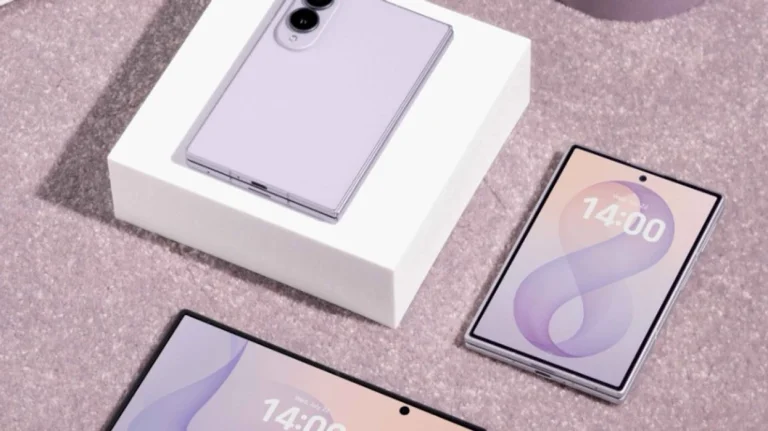
If you handed someone your phone for just five minutes, how much could they learn about you? Perhaps far more than you think. All they would have to do is look at your photo gallery, recent messages, search history or the apps you use every day.
Your phone also stores contacts, work communications, payment information and many small details that, taken together, can reveal a clear picture of our habits.
Phones have long since become much more than devices for calls and messages. They contain almost our entire digital lives, while the development of artificial intelligence is making them even more useful and better tailored to our needs. For this reason, when choosing a new device, the way this information is protected is becoming increasingly important.
This is one of the aspects Samsung highlights in its new Galaxy Z Fold8 and Galaxy Z Fold8 Ultra models, which combine advanced features with privacy protection technologies.
How much do we reveal without realizing it?
Think about how many times you unlock your phone during the day. You check the weather forecast, open social media, reply to a work email or order something online. Behind many of these everyday actions are apps that use various kinds of information, from our location to access to the camera, microphone or photos.
For this reason, it is important to know what is happening in the background. On Samsung Galaxy devices, the Privacy Dashboard provides an overview of apps that have accessed certain data and allows you to manage their permissions.
For example, users can check which apps have used their location or microphone and decide whether they want to allow them access again.
One useful option is to allow access to your location only while using the app, rather than making this information constantly available. Similarly, access to the camera and microphone can be restricted when they are not needed.
On the Samsung Galaxy Z Fold8 and Galaxy Z Fold8 Ultra models, these settings are part of the everyday user experience. Instead of complicated security procedures, you only need to check a few options from time to time to decide what information apps can use.
When your phone gets smarter, the decision should remain yours
Artificial intelligence is increasingly helping us with everyday tasks. It can make it easier to search for information, edit photos, translate texts and organize activities.
On the Galaxy Z Fold8 and Galaxy Z Fold8 Ultra models, Galaxy AI features are designed to make these tasks easier for users. However, it is just as important for them to be able to decide for themselves how to use these features.
Samsung makes it possible for data processing for some supported Galaxy AI features to take place directly on the device, without being sent to cloud storage.
This can be particularly useful when working with professional documents or information that users want to keep on their phone. However, some advanced features require cloud processing, so users can choose the settings that suit them best.
In this way, artificial intelligence can remain a practical aid while giving users more control over how they use it.
How is the data you store on your phone protected?
Most people today lock their phones with a fingerprint, PIN code or facial recognition. This is a good first step, but when the same device stores family photos, work communications and access to banking apps, it is important to have additional safeguards in place.
On Galaxy devices, security extends beyond the locked screen. Samsung Knox is a security platform that protects the device on several levels, while Knox Vault provides a separate, secure environment for the most sensitive information, such as PIN codes, passwords and the data needed for biometric authentication.
Simply put, Knox Vault works like an additional secure space inside the phone, separate from its main system.
This gives important data an additional layer of protection, even if someone tries to access the device without authorization.
This technology is also available on the Galaxy Z Fold8 and Galaxy Z Fold8 Ultra models. Its main advantage is that it works in the background while users continue using their phones normally.
Try the Galaxy experience before switching phones
When thinking about buying a new phone, we usually focus on the camera, design or battery life. However, how easily we can use its features also matters, particularly the settings we need every day.
For those who want to get to know the Samsung Galaxy experience, there is the interactive Try Galaxy app, which allows users of other phones to try some Galaxy features on their current device.
With it, they can explore the user interface, try demonstrations of some Galaxy AI features and get a clearer idea of what Galaxy devices offer, including the new foldable phones.
This gives users the opportunity to get to know the system before buying and assess whether the way it works suits them.
The most important thing is that the decision remains in your hands
Phones today can perform many tasks for us, from simple ones to advanced features powered by artificial intelligence.
However, how useful these capabilities will be also depends on how we adapt them to our habits and needs.
Samsung Galaxy Z Fold8 and Galaxy Z Fold8 Ultra illustrate how practical artificial intelligence features, simple privacy settings and security technologies can be combined in a single user experience.
Ultimately, there is no need to know every technical detail about your phone. What matters more is knowing what options are available to us and setting aside a few minutes now and then to tailor the device to our needs, rather than adapting ourselves to it. /Telegrafi/
Related

Technology
GTA 6 is launching this week, here are the date and details you need to know

Technology
YouTube, Facebook or TikTok? Here’s which social network Americans use most
Technology
Microsoft says its services have fully recovered after a day-long global outage
Technology
Microsoft outage paralyzes businesses, schools and government institutions around the world

Technology
Microsoft Platforms Face a Global Outage

Technology
Robot Takes on Humans in Antarctica Marathon, but Gives Up After 3 Kilometers
Technology
Google will add a dictionary to Gboard that saves words corrected during voice dictation

Technology
WhatsApp introduces “Events Home,” making it easier to organize get-togethers

Technology
Honda puts revolutionary V3 engine into production
Technology
WhatsApp tests a new feature

Technology
DokuTech 13, Kurti: Technology, the most dynamic sector of the economy

Technology
Windows 11 Gets Significantly Faster